Returns a specified part of a given date.
Syntax
      DatePart(interval, date [,firstdayofweek[, firstweekofyear]])

Key
   interval  The interval of time to return.

   date      The dates to evaluate (Date).

   firstdayofweek  A constant (0-7) that specifies the first day of the week.
                   default=vbSunday (1).

   firstweekofyear A constant (0-3) that specifies the first week of the year.
                   default = the week in which January 1 occurs (1).
| Interval | Description |
|---|---|
| yyyy | Year |
| q | Quarter |
| m | Month |
| y | Day of year |
| d | Day |
| w | Weekday |
| ww | Week |
| h | Hour |
| n | Minute |
| s | Second |
FirstWeekConstants:
0 vbUseSystem - Use the NLS API setting.
1 vbFirstJan1 - Start with week in which January 1 occurs (default).
2 vbFirstFourDays - Start with the first week that has at least four days in the new year.
3 vbFirstFullWeek - Start with first full week of the year.
The firstdayofweek argument will affect calculations that use week intervals.
To produce a correct ISO 8601 week of the year requires a function, if this is saved in a module it can be used in VBA or in an SQL query:
Function ISOWeekNum(dtmDate)
' Returns a WeekNumber from a date
Dim NearThurs
NearThurs = ((dtmDate+5) \ 7) * 7 - 2
ISOWeekNum = ((NearThurs - DateSerial(Year(NearThurs), 1, 1)) \ 7) + 1
End function
Msgbox "ISOWeekNumber: " & ISOWeekNum(cdate("2017-12-25"))
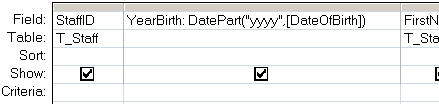
The DatePart() function can be used in VBA or in an SQL query.
In a query:
In VBA:
DatePart("d", Now)
DatePart("w", "Feb 12")
“An essential aspect of creativity is not being afraid to fail” ~ Edwin Land
Date - Return the current date.
DateAdd - Add a time interval to a date.
DateDiff - Return the time difference between two dates.
Weekday - Return the weekday (1-7) from a date.
WeekdayName - Return the day of the week.
Q200299 - Format or DatePart Functions return wrong Week number for last Monday in year.